The basics (what most people record)
A minimal subscription record typically includes:
- Subscription name and vendor - what the tool is and who provides it
- Monthly or annual cost - including the currency if you're paying across multiple currencies
- Next renewal date - when the next charge will appear
- Billing cycle - monthly or annual, so you know how frequently the charge recurs
This is the foundation - and if you haven't built it yet, start with our guide on how to track software subscriptions. It's enough to know what you have and roughly when you'll be charged. But it leaves out the details that matter most when you actually need to act on a subscription - cancel it, reassign it, or justify the cost to someone who's questioning it.
What most people miss
The cancellation link
The single most useful thing you can store with a subscription record is the direct URL to cancel it - not the vendor's homepage, not the billing page, but the specific URL where you click to cancel.
Without it, cancelling a subscription when you're under time pressure - a renewal is two days away, the person who set it up has left, and you're trying to act quickly - means 20+ minutes navigating support documentation, live chat queues, and vendor settings pages.
Save the cancellation link when you first set up the subscription. It takes 30 seconds at the time and is worth considerably more later.
The subscription owner
Every subscription should have a named owner: the person responsible for it, who can explain what it's used for, whether it's still needed, and what would happen if it were cancelled.
Record their name, email, and department. When that person leaves the company - which will eventually happen - the subscription otherwise becomes an orphan: still active, still charging, with no one who knows why it exists.
Ownership information also matters for renewals. If a renewal decision needs to be made, the named owner is the right person to make it. Without a record, it defaults to whoever happens to notice the charge.
The payment method
Record which card or bank account is used for each subscription. This matters in two situations:
- When a card expires or is replaced, you need to know which subscriptions to update. Without a record, you find out when the charge fails - sometimes after the renewal has already been missed.
- When reviewing spend, knowing which payment method a subscription is on makes it easier to reconcile charges against statements.
Document links
Keep links to the documents associated with each subscription:
- Invoice URL or PDF for the most recent charge - useful for expense reporting and accounting
- Contract or vendor agreement, if one exists - particularly relevant for enterprise tools or anything with a committed term
- Receipt links if they're needed for VAT reclaim or expense submission
These documents often live in email inboxes or shared drives with no connection to the subscription they relate to. Linking them from the subscription record makes them findable when needed.
Usage notes
A subscription record is more useful when it includes context about how the tool is actually being used:
- How many seats are paid for, and how many are actively in use?
- Which team, department, or project does this tool primarily serve?
- When was this subscription last reviewed?
- Why was it added in the first place - what problem was it solving?
Usage notes are particularly valuable at renewal time. Instead of making a gut-feel decision about whether to keep a tool, you have the context to make an informed one.
Cancellation policy details
Some subscriptions have cancellation conditions that aren't obvious from the billing page:
- Notice period required before cancellation. Some annual plans require 30 or 60 days' notice before the renewal date to avoid being charged for the next period.
- Refund eligibility. Most SaaS subscriptions have a defined refund window - CostLoop's refund policy is a straightforward example of what this typically looks like. Knowing whether a refund is possible before you cancel is useful context.
- The effective cancel-by date. Given the notice period, what's the actual last date you can cancel and avoid the next charge? Record this explicitly - it's the date that actually matters.
Why this matters more than you think
The value of a complete subscription record isn't obvious until you're in a situation where you need the information quickly - especially when you're trying to avoid a forgotten renewal. quickly and don't have it.
Consider what happens when the person who manages a tool leaves the company. Without an owner name and contact, the subscription becomes invisible. Without a cancellation link, cancelling it takes significant effort. Without usage notes, nobody knows whether it's safe to cancel or who to ask.
Or consider a card change. Without a record of which subscriptions use which payment method, you're notified of failed charges one by one - reactively, after the disruption has already happened.
The overhead of capturing these details is small - our subscription audit checklist makes this even faster. The cost of not having them - when a renewal surprises you, a card expires, or a decision needs to be made in a hurry - is consistently higher.
Using CostLoop to store all of this
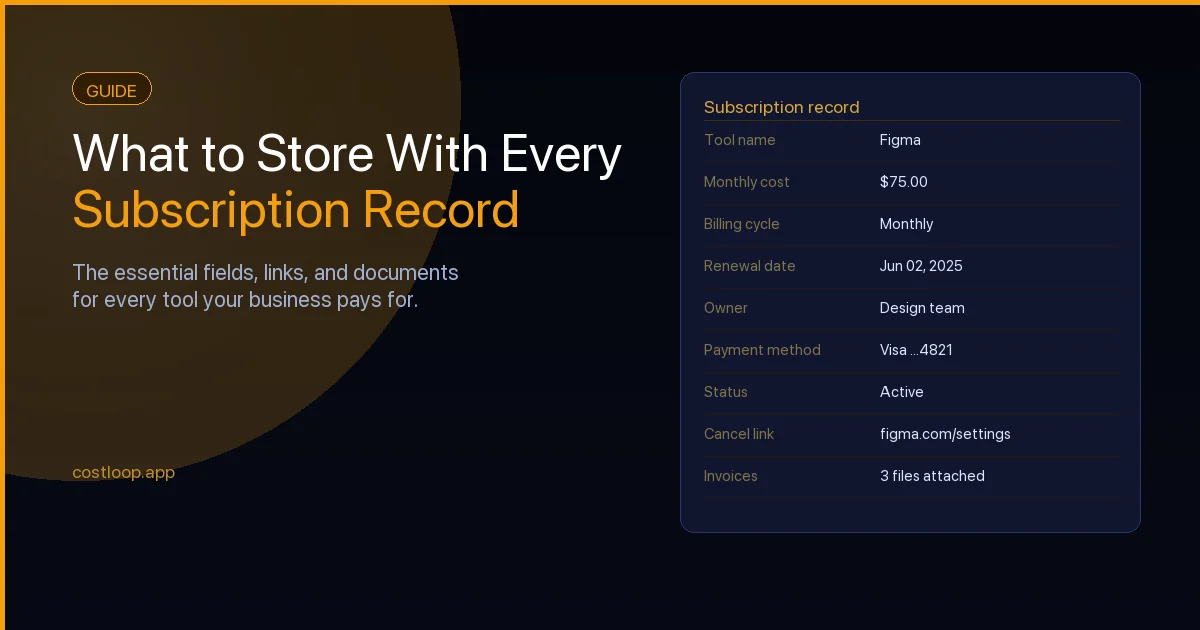
A SaaS subscription tracker is designed around the idea that a subscription record should hold all of this context in one place. Each subscription in CostLoop has fields for cost, renewal date, billing cycle, owner, cancellation link, invoice URL, contract URL, usage notes, payment method, and status. Keeping records this complete is one of the core subscription management best practices that separates businesses with control over their costs from those constantly surprised by renewals.
Renewal reminders are sent automatically based on the dates you record, so you're prompted to review each subscription before the charge arrives - with all the context you need to make a quick, informed decision.
See everything CostLoop tracks and how the subscription record is structured.
Start building complete subscription records
CostLoop is free to start. Track your first subscription with all the fields that matter - cost, renewal date, owner, cancellation link, and more.
Get started free